Archive Post
IP EPABX vs Digital EPABX — which is right for your business in 2025?
Both technologies can handle your internal telephony. Both will take calls, transfer extensions, and ring your front desk. But they have very different cost profiles, scalability limits, cabling requirements and — most importantly — futures. After 40 years of installing both, here is our honest assessment.
What is a Digital EPABX?
A Digital EPABX (Electronic Private Automatic Branch Exchange) uses traditional copper pair wiring to connect handsets to a central controller. It has been the standard for Indian office telephony since the 1980s and remains a reliable, proven technology.
Each extension requires a dedicated pair of copper wires running from the handset back to the main EPABX cabinet. The handsets are proprietary — typically manufactured by the same company as the EPABX — and communicate using a digital signalling protocol specific to that vendor.
At Ankur Telecom, we still install and maintain Digital EPABX systems where they make sense — particularly for clients with existing copper infrastructure, smaller extension counts, or budget constraints. Technology choice should follow the requirement, not the sales trend.
What is an IP EPABX?
An IP EPABX (also called IP-PBX) routes calls over your existing data network using the VoIP (Voice over IP) protocol. Handsets connect via a standard RJ-45 data port — the same infrastructure your computers use. Some IP systems also support software “softphones” that run on laptops and mobiles.
This means no dedicated copper wiring per extension — just your existing network. Extensions can be added by simply plugging a handset into any network port. Remote extensions (at home, at a branch office, on a mobile) are as easy to add as local ones.
The honest comparison
| Factor | Digital EPABX | IP EPABX |
|---|---|---|
| Upfront cost | Lower hardware cost | Similar or slightly higher |
| Cabling requirement | Dedicated copper per extension | Existing data network |
| Scalability | Limited by cabinet capacity | Add extensions at any network point |
| Remote extensions | Not supported | Full support (home, mobile, branch) |
| Handset choice | Vendor-locked proprietary phones | Any SIP-compliant handset |
| Call reporting | Basic CDR available | Full real-time analytics |
| Integration (CRM, Teams) | Limited or none | Native integration available |
| Long-term parts supply | Becoming harder to source | Standard network components |
| Power requirement | Separate power per phone | PoE from switch (single cable) |
When Digital EPABX still makes sense
Despite the clear direction of travel toward IP, there are specific scenarios where a Digital EPABX remains the right choice:
- Existing copper infrastructure: If your building already has dedicated copper pairs to every desk, a digital system avoids the cost of recabling entirely.
- Small extension count (under 20): For very small offices, the per-port cost advantage of digital can outweigh the flexibility benefits of IP.
- No data network, or unreliable one: An IP phone is only as reliable as the network it runs on. In environments with poor network quality, digital provides more predictable call quality.
- Budget is the primary constraint: Digital systems have lower entry-level hardware costs and can be a pragmatic short-term choice.
One thing to consider: If you install a Digital EPABX today, plan for the fact that manufacturer support for older digital systems is gradually being wound down. Parts availability will only get harder. This doesn’t mean don’t install one — but factor in a realistic replacement horizon of 5–8 years rather than the 15–20 years a well-maintained IP system can run.
When IP EPABX is the right call
For most new installations in 2025, IP is the default recommendation. Specifically:
- New buildings or offices with structured cabling: You already have Cat6 to every desk. Use it for your phones too.
- Growing organisations: Adding extensions is as simple as plugging in a handset anywhere on your network.
- Multi-site operations: Branch offices and home workers get full EPABX extensions over the internet — same directory, same call transfers, same hunt groups.
- Organisations that need call reporting: IP systems give you real-time dashboards, missed call tracking, and call recording as standard features.
- Healthcare, hospitality, and education: These sectors have specific integration requirements (nurse call, room management, campus paging) that are only practical to implement over IP.
The migration question
If you’re currently on a Digital EPABX and considering migration to IP, the honest answer is: it depends on your cabling. If your building has good structured cabling (Cat5e or better), migration is straightforward — new IP handsets plug into existing data ports, the old EPABX cabinet is removed, and the IP system is configured to maintain all existing extensions.
Where buildings have only old copper pairs and no data cabling, the cost of laying Cat6 cabling becomes part of the project cost. In our experience, this is almost always worthwhile for offices over 30 extensions — the long-term flexibility benefit far outweighs the one-time cabling investment.
Our recommendation: Before making any decision, get a site survey done. A qualified engineer will assess your existing cabling, extension count, growth plans, and budget — and give you an honest view of which technology makes sense for your specific building. We offer free site surveys with no obligation to proceed.
What we recommend for most Indian businesses in 2025
For new installations and replacement projects, we recommend IP EPABX for the vast majority of businesses. The flexibility, scalability, and long-term parts availability make it the right foundation for a 10–15 year telephony infrastructure investment.
For clients replacing an existing Digital EPABX and primarily concerned with cost, we look at the specific situation — sometimes a like-for-like digital replacement makes financial sense in the short term, with a planned IP upgrade in 3–5 years. We’ll always tell you which option is right for your situation, not which one has the higher margin.
Hello world!
Welcome to WordPress. This is your first post. Edit or delete it, then start writing!
Rapid demand of Video Conference during Coronavirus Outbreak
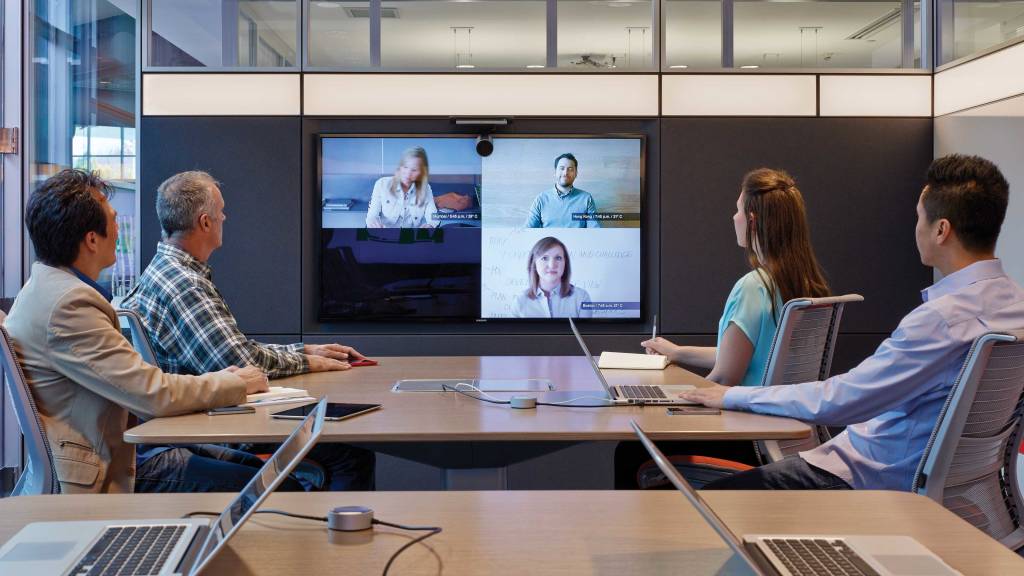
Demand for Video conferencing increases amid fear of Coronavirus
Demand of Video conferencing software has risen sporadically. Many businesses have shut down their offices in China, where the pneumonia-like disease originated, as officials try to contain it from spreading. More than 17,000 cases have been found in that country and more than 360 there have reportedly died since it was first discovered in the city of Wuhan in December
Since travelling is restricted, we need a reliable source for communication and conducting business to have a deeper engagement across your company’s employees, customers and partners. What better than Video Conference
Companies like Amazon, Google and Microsoft have restricted their employees to travel until further notice as they are following the health and safety guidelines provided by international health agencies such as the CDC and WHO
How will Video Conference break the distance barrier?
- Reach out to several people at the same time
Video conferencing allows you to conduct meetings with several people at the same time. You can talk and chat with people from different parts of the world at the ease of your residence or office. Business owners can connect with clients and employees and hold discussions. Strategic planning and meetings which require several members to be present can be carried out with ease. - Save time and money on your travels
It saves time and money related to business travel. Business owners connect with people by video conference for routine meetings, negotiating deals, interviewing candidates, etc. Thus, a lot of money gets saved from the cost of traveling to different locations. - Bind all your workers through one software
Your business may have mobile workers who are scattered throughout different locations. You can bind them all through video conferencing from their mobile phones. It also allows you to check the whereabouts and the activities of the employees. - Increase in productivity
You get an increase in productivity among teams. Video conferencing enables participants to stay more focused and alert on the topic of discussion. Thus projects get completed much faster. Productivity also increases and your employees feel more in sync with each other.
- A better way to interact and connect with people
Video conferencing helps to improve communication and re-establish relationships. During a video conference you get to see the body language and facial expressions of the participants. This leads to a more effective and faster collaboration. It helps to make the employees feel that they are close to the home office also. It helps employees to gain trust in their employers and betters understanding among them also. - Aiding telecommunication
Video conferencing also helps telecommunication. It helps to provide a visual display to your normal audio call. If employees have flexible work timings, then video conferencing can be a good way to curb a lack of interaction among employees.
Video conferencing is beneficial for both business and corporations. In this time of virus breakout, multinationals could connect with employees on video conference. It has led to a rise in usage of video conferencing apps and software. From reduced costs of travel, faster completion of projects to improved communications among members of a team, video conferencing can be a boon for any business or organization despite the coronavirus looming on a global level
Source: https://www.cnbc.com/2020/02/03/zoom-video-is-seeing-record-usage-amid-coronavirus-fears-ceo-says.html, https://www.cnbc.com/2020/01/29/coronavirus-latest-updates.html, http://customerthink.com/why-video-conferencing-is-important-in-business/
Sell Your Boss on Telecommuting

It is time for a change. That last commute to work was one commute too many, and as you sit at your desk, your dread of the journey home is already building.
You’re ready to start telecommuting. You’ve got all the necessary video conferencing and office workflow equipment you need at home. You deal with clients exclusively through remote communications anyway, and there’s always someone calling in from another branch office whenever you have a team meeting.
Working from home means you’ll be happier, healthier, have a better work/life balance, and will recoup those hours of lost travel time, but what’s in it for the company? Why should your supervisor let you out of the building and trust you to perform your job from home?
How to Ask to Work from Home
Your boss is not a machine. What you need is a series of valid reasons to prove that telecommuting is good for your company. So here they are. Six ways to convince your company that telecommuting is good business, beginning with Video Conferencing.
- My workstation won’t Cost You a Penny
The fewer demands you make on your employer, the more likely they are to support your decision. So make sure you let your boss know they won’t be on the hook for any expenses involved in setting up your new home office.
For remote workers in most professions, all it takes is a quiet corner, a personal computer, a quality webcam, and an internet connection and you’re set to succeed. The most expensive piece of that technological puzzle is your webcam, and you can get a state-of-the-art, 4K-capable, facial recognition-equipped camera for just a few hundred dollars.
Chances are, you can also keep up with all your meetings by using the same video conferencing vendor and account you’re already hooked up with at work.
- Telecommuting Will Save Us Money
Some of the biggest companies in the world have been using telecommuting to save themselves millions of dollars. A smaller onsite workforce needs less space, fewer facilities, less equipment, and less coffee and donuts in the office breakroom.
Moreover, telecommuting staff cost less to maintain as they are generally happier and healthier and so take fewer sick days, less annual leave, and stay in the job longer, reducing the cost of hiring and training replacements.
- It will be Productive
Having a better work/life balance makes employees more likely to clock in for work each day. Research has shown, in fact, that remote employees are happier than their onsite colleagues (which alone leads to greater productivity), put in an average of five more hours of work per week, and are as much as 40 percent more productive. That’s not to mention that remote employees are more likely to telework while mildly sick rather than taking a sick day in order to get comfy at home. And, the health benefits of working from home mean that remote employees are less likely to get sick in the first place.
- I’d Prefer Telecommuting Over a Pay Raise
No one wants less money, but if you consider the amount you spend on commuting every day and the related costs of spending so much time away from home, there are counterbalancing savings to be had–how many paid lunches would you shell out for if you had your personal fridge at your disposal?
There’s an obvious benefit here for your employer, and you’d be far from the first person to suggest such an exchange. Recent research found 36 percent of workers would prefer a work from home option over a pay raise. In fact, a poll of technology workers found that a similar percentage–37 percent–were actually willing to take a ten percent pay cut for the chance to work from home. Those are some serious savings for any company willing to set some of its workers loose to work remotely–and, if you’re willing to forgo your annual pay review, that alone could be a very persuasive argument for your employer.
- It’s Great for the Environment…Which Is Great for Our Reputation
Green is the new black. The workforce is getting younger and younger each year as millennials rise up the corporate ladder and Generation Z starts to enter the equation. One thing we know about these emerging generations is they care about the environment more than their predecessors. So, if a business wants to attract the right workers and the right customers, they need to show they care about sustainability.
Telecommuting is one of the greenest initiatives a business can undertake. There are a host of environmental advantages to taking commuters’ cars off the roads, reducing power consumption at the office, and decongesting our cities.
- Everyone Else Is Doing It
In the end, you’re not actually suggesting anything outrageous by asking to work remotely. more than 50 percent of worldwide employees work from home at least half the week. Telecommuting is quickly becoming the new normal.
The digital revolution began long ago, and if your employer is not using this new hybrid of communication and travel to maximize their employees’ work/life balance and productivity, they are behind the times.
Source: https://www.videoconferencingdaily.com/
Trends Impacting Business Telephony

Trends Impacting Business Telephony
Technology is all around us and is constantly evolving, especially when it comes to communications. To help you keep up with the pace of change, this section summarizes eight key trends that relate to telephony. The analysis below explains how each trend plays into the decisions you’ll need to consider when moving to VoIP.
Trend #1 – Mobility
Implications for SIP phones: Mobility is the hottest trend in communications and some businesses have indeed moved away from desk phones completely. Most businesses, however, are not ready to do that, and when it comes to telephony, fixed-line VoIP remains the best path for them. Mobility may become the preferred mode for data applications, but for everyday telephony, it’s more expensive and less reliable than desk phones. You should also consider the user experience, as mobile devices are simply not comfortable for people who are constantly on the phone – and at the mercy of battery life limitations and dead zones when roaming about.
Keep in mind that the definition of mobility is broad, and, in some cases, mobility inside the office environment is more important than being mobile outside the office. In this regard, SIP phones can provide enough mobility coverage for telephony, with many advantages over personal wireless devices.
Whatever your needs, as 4G and LTE networks mature, wireless VoIP will become more common. For now, however, your internal telephony needs are best served with SIP phones, reserving smartphones for voice when employees are on the go outside the office
Trend #2 – BYOD
Implications for SIP phones: Bring Your Own Device reflects the rise of smart devices in the consumer world. With mobile broadband being almost everywhere, demand has made these devices affordable; seemingly everyone at the office has one. Employees are increasingly bringing these devices to work with the expectation of using them for both business and personal communication. This puts tremendous strain on the network and reduces IT’s ability to manage data flows.
To address this trend, businesses have been upgrading their networks with better management tools and security elements, but the habits of mobile users tend to evolve faster than IT’s ability to keep pace. BYOD will continue to pose challenges for businesses. As part of the broader mobility trend, things will only get more complex and costly. Of course, there are many benefits, making BYOD too important to ignore; banning mobility outright at work simply isn’t an option.
BYOD may be a major trend, but it is much more about data than voice. To the extent that BYOD represents a pain point for your business, you can rest assured that SIP phones are outside this realm, making VoIP a relatively low-risk investment.
Trend #3 – Cloud Communications
Implications for SIP phones: Over time, the cloud will be an even bigger trend than mobility. Explaining why is beyond the scope of this paper, however. VoIP’s rise is part of the broader shift of technology from hardware to software, which is now being superseded by the ability to move applications and services from being premise-based to being hosted in the cloud. In short, this is the on-demand utility model, where the business gives up ownership in favor of the cash-flow-friendly, decentralized approach to managing communications technology.
This evolution is great news for SMBs, as VoIP is a relatively easy service to host in the cloud. In the past, VoIP options for SMBs were limited, with the offerings only moderately attractive pricewise and often too complex for existing IT resources to manage. Cloud-based VoIP scales up or down seamlessly, making it viable for businesses of all sizes and highly adaptable for varying demand levels and growth scenarios when adding new locations or headcount.
Another virtue of the hosted model is the ease of deploying VoIP with SIP phones. Along with the affordability of these phones, the overall value proposition is very strong, especially when compared to legacy telephony.
Trend #4 – Changing Workplace
Implications for SIP phones: Workforce demographics are trending younger and changing the workplace. The nature of work itself is evolving in today’s Internet-centric world and information-based economy. Millennials are tech-savvy knowledge workers, with expectations that are quite different from their pre-Internet co-workers. They expect applications to be flexible and customizable and will find VoIP very familiar in that regard.
Beyond these expectations, however, is a change in how and where work gets done. Businesses are increasingly decentralized, especially when serving a global customer base. This leads to a disparate workforce that may rarely meet in the same place to collaborate. If that describes your reality, then VoIP is definitely the right move, especially for providing a distributed employee base with a reliable form of real-time communications. Near-real-time tools like email and chat are efficient, but telephony is more immersive, plus the intimacy helps employees feel connected. SIP phones play a key role in delivering that experience, and their affordability makes it easy to support all employees – no matter where they’re located.
Trend #5 – Improved Productivity
Implications for SIP phones: Competitive pressures facing all businesses today make productivity a core driver of success. Everyone wants to be productive, but the reality is we have too many tools, too much information and too many demands on our time. All SMBs will be receptive to new tools that boost productivity, especially those that are easy to deploy and easy for employees to use.
VoIP fits those requirements very well, although it may be difficult to see how it enhances productivity. When deployed from the cloud, SIP phones make VoIP a plug-and-play service that works from any Internet connection. This matters when you consider that VoIP has a richer feature set than legacy services. While it’s easy to think of telephony as a one-dimensional commodity, VoIP is highly customizable, allowing employees to tailor features to their specific preferences. Typical examples would include custom ring settings for specific callers, updating voicemail message remotely, changing call forwarding settings on the fly, and prioritizing the order for reviewing voicemails. This level of flexibility is an upgrade from legacy telephony, and once new features such as ad hoc conferencing and visual voicemail are in use, employee productivity should noticeably improve.
Trend #6 – Opex over Capex
Implications for SIP phones: The shift from Capex to Opex ties into the cloud trend and is highly relevant for VoIP. For most businesses, telephony is a Capex decision, especially those with a legacy PBX system. Telephony has clearly moved away from this model, but that is the history businesses know best. Whether premise-based or hosted, VoIP holds appeal by shifting telephony to Opex. With cash flow being critical for SMBs, this shift is a key value driver. Long term, businesses may not be ahead financially with the Opex model, but it’s hard to argue against the benefits that will be realized right from the start and remain in place going forward.
A key part of that appeal is the affordability of SIP phones. In the early days of VoIP, the price point was too high for SMBs. As demand grew and production costs fell, a wide range of SIP phones became available for any budget. Given technology’s pace of change, there is no need to buy Capex-priced phone systems with a lifespan of more than ten years. Today’s SIP phones are built to reflect that, and when funded with an Opex model, acquisition cost should no longer be an obstacle to adopting VoIP.
Trend #7 – Growing complexity
Implications for SIP phones: This is another cloud-related trend and speaks to the IT limitations that most SMBs face. Not only are resources often scarce, but cost-conscious businesses are increasingly outsourcing IT-managed functions to the cloud. SIP telephony has matured to the point where outsourcing IT is becoming the deployment model of choice, especially for these situations.
Key implications of the increasingly complex nature of technology are the high cost and expertise needed by IT departments to properly support legacy telephony. When businesses migrate to VoIP, that expertise is no longer needed and the cost savings can be allocated to other areas where IT still adds value. This is actually a challenge for SMBs when it comes to VoIP, as the incoming technology is new and complex in ways they are not trained to manage. But that doesn’t get in the way of adopting VoIP, as the cloud makes it a non-issue. SIP phones make this an even easier decision, since end-users can do a lot of their own provisioning, resulting in fewer demands on IT than legacy phones create.
Trend #8 – Legacy losing relevance
Implications for SIP phones: The sum of the overall impact of the above trends is perhaps the most telling shift in terms of what the future holds. While most businesses still have functioning legacy phone systems, virtually everything else they use is based on modern technology. The PSTN may still be the gold standard for telephony, but the cost doesn’t justify the benefit and VoIP is simply a better technology for voice.
The need for telephony does not change, but the technology has, as has the role of telephony. Voice remains the best form of real-time indirect communication, but its value is declining the longer it remains segregated from all the other modes we use to get our work done. Whereas legacy telephony functions in its own closed world, VoIP is seamlessly tied into everything else by virtue of running over the same network as email, chat, video, etc. This is how people work today, and SIP phones provide a great bridge between the old and the new. Since the experience basically replicates legacy systems, SIP phones are totally familiar for employees, so there is no barrier to usage. At the same time, they add business value by bringing telephony into the 21st century with new features that make employees more productive.
Source:vrtech.com
Understanding Video Conferencing Components
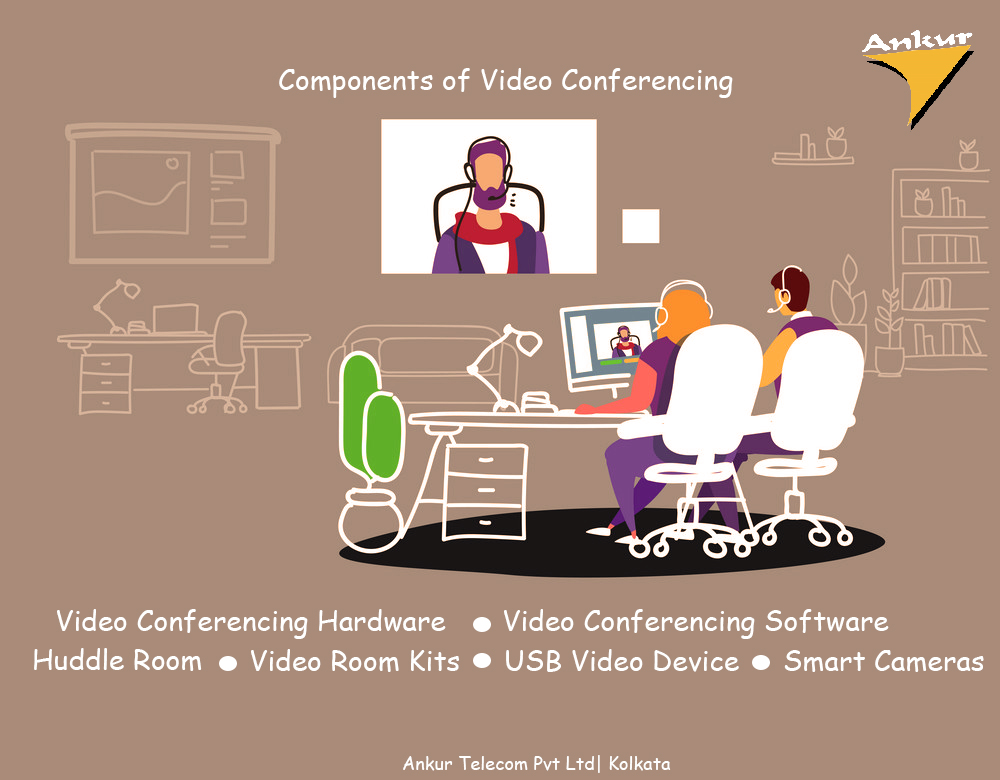
Earlier video conferencing was a way to connect two conference rooms in the same building. Video conferencing components had limited capabilities. In addition, Integration and Collaboration was a challenge because devices and software from different vendors often didn’t work with each other. Video conferencing has matured, and most organizations use video as part of their unified communications strategy.
Video conferencing is no longer relegated to use in the boardroom only. The number of vendors offering video conferencing components has increased, giving organizations more choice in selecting the best video options for their businesses.
Components of a video conferencing system
Video conferencing hardware- Hardware refers to the physical components of video conferencing, such as cameras, microphones and speakers. Hardware has evolved from simple but expensive options aimed solely at large conference rooms to more mature offerings for smaller meeting spaces. Cameras now have more capabilities with a lower price point, giving organizations more options when it comes to the hardware that best suits their needs.
Video conferencing software- Software controls the video meeting experience by enabling users to make calls and, sometimes, providing additional capabilities, such as chat and file sharing. As the demands for video conferencing have evolved, the number of vendors offering video conferencing software has risen. Video conferencing software may be offered as a stand-alone product, or it may be built directly into video hardware.
Early on, interoperability between new video software offerings and legacy hardware was a challenge. Now, vendors are beginning to partner to bring customers offerings that blend hardware and software into a single integrated option.
Huddle rooms- Huddle rooms are small rooms intended for use by two to six people. Unlike larger boardrooms meant to disseminate information to large groups, huddle rooms are intended as a space for small groups to collaborate and get work done. Organizations have started adding video conferencing capabilities to theses spaces as employees increasingly need video to collaborate effectively. Because of their size, huddle rooms have different video conferencing needs than a traditional conference room, such as different microphone sensitivity and camera framing.
Video room kits- Kits are often intended for smaller spaces, such as huddle rooms. The components included in a video room kit vary from vendor to vendor but usually include a camera, speaker and microphone in an all-in-one piece of equipment. Video room kits also eliminate potential interoperability issues by providing all the necessary hardware and software.
USB video devices- To handle hardware and software interoperability issues, some vendors offer USB-driven video devices to provide universal compatibility with video software. The device connects to any laptop or control hub using a USB port. Organizations using different video services can benefit from the universal compatibility offered by USB video devices.
Smart cameras- Smart cameras are video cameras with AI capabilities. Unlike traditional video cameras that need to be positioned and operated to change the field of view, the AI in smart cameras can automatically zoom in or out to track active speakers. Some smart cameras can also blur backgrounds, identify objects and count the number of people in a room.
Source: https://searchunifiedcommunications.techtarget.com/
How can Interactive Panels boost your office productivity and customer experience?

Utilizing an interactive flat panel for your business can have several benefits. Aside from their novelty and the fascination it brings, touch systems can reach out to customers, save you time and money, improve productivity and gather valuable customer data all on one customizable platform.
With the help of interactive flat panels, you would no longer have to use flip charts, illegible diagrams or marker pens. In addition to that, you will not need overhead projectors that contain bulbs that burn out right in the middle of an important presentation. Given these and many more advantages, it’s about time that you incorporate interactive flat panels into your office
Engaging and Informative
Interactive screens can not only wow your customers, they can also be a power tool to reach out and engage with them. But finding the right provider is key. With the variety of software and mounting options available, you can present information in a stimulating, engaging way. It can improve the customer experience and take some pressure off of staff.
Time and Cost Saving
Not only will your customers be impressed by the hands-on approach to marketing, an interactive touch screen can save you time and money. Rather than paying someone an hourly rate to interact with clients on a broad level, a mounted touch display can present all the basic information they need, and save you manpower. This means before you approach clients or customers, they have already made the first steps toward understanding and identifying with your brand and business. In busy situations, this can be incredibly useful as a time saver.
Customer Feedback
One of the greatest advantages of using this state of the art technology is the chance to gather valuable data about customers and their habits. An interactive touch screen can record how users interact with it, giving insight into how they behave and what their preferences are. Having a survey or satisfaction questionnaire at the end of their interaction is also a good way of collecting data on how customers feel about your service. From this data, you can make improvements to increase satisfaction and customer service.
Transforms Meetings
Meetings can be dull sometimes because they are never ending. We end up making half-hearted notes that are not even complete. Interactive flat panels will fill your meetings with amazing visuals, stunning sound quality and availability of motivating applications and content. Additionally, you will be able to easily record notes automatically and capture screenshots whenever you want. All the screenshots can then be distributed to all when the meeting ends.
Also, we all know how difficult it is to get everyone together and update them at a particular place in a particular time. By using intuitive interactive flat panel displays throughout your meeting rooms, off-site locations and other areas in office, you can share ideas and information in a hassle-free way. This is because these interactive panels contain built-in PCs that make information flow possible.
Controls Workflow
By using an interactive flat panel, one can show multiple projects on the display, which will talk about the level at which the office projects are currently at. In addition to this, employees will be able to access updates in real-time. This feature is extremely effective in sharing the progress when meetings are conducted.
Improving key performance indicators
A healthy competitive environment does not harm any employee; it only motivates him/her. Interactive flat panels are a major help in this regard. Many companies use screens that show key performance indicators. For instance, take the customer service team. They can track problems and how they were taken care of. Plus, they can also have a look at sales figures on these flat panels and check how they are performing in terms of target. Installing and providing such a display will help in motivating and inspiring an office’s team towards business growth and fruitful results.
Bottom line, the benefits of interactive flat panels to boost office productivity is there for all to see. The trick is in integrating and using it in the right manner.
Source: digitaltouchsystems.com; www.c3itxperts.com
Cloud Telephony Service- A must-have for Startups
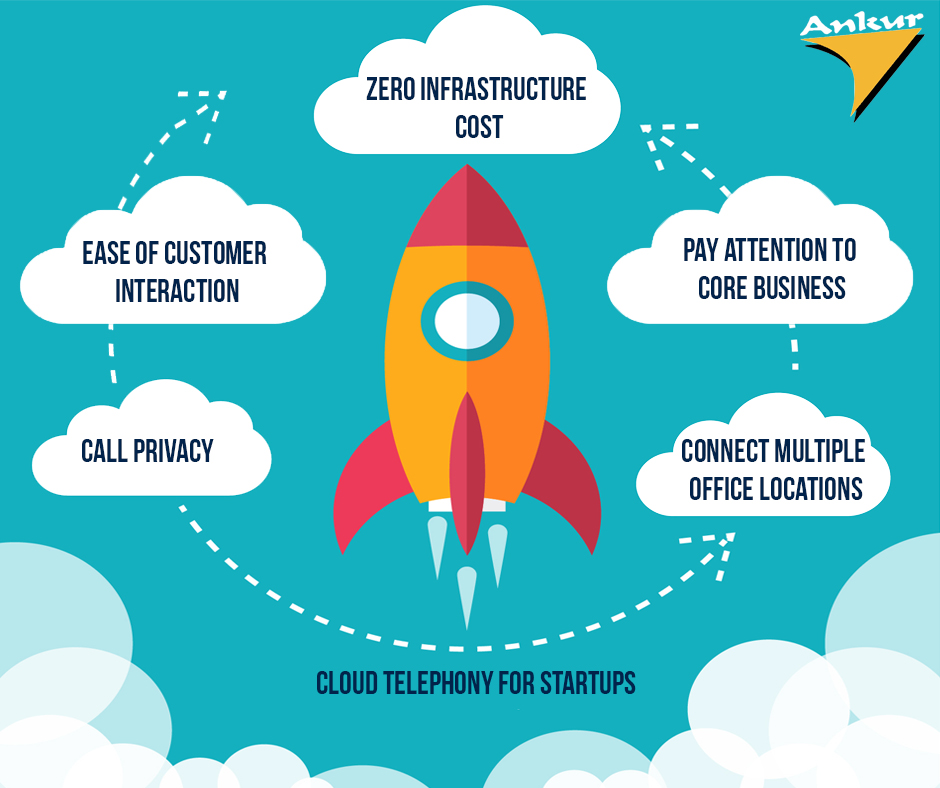
Customer interaction is very important for a startup to succeed.Technology can help startups succeed not only by allowing them to serve customers in innovative ways but also help them by answering queries effectively and in a timely manner.
Feeling the pulse of an industry is essential to the success of a company as is keeping customers satisfied. A cloud telephony system allows startups to feel an industries pulse, and to also serve their customers well because it is a technology that uses virtual or cloud-hosted numbers and does not demand additional infrastructure.
What are the other advantages of a cloud telephony system?
Zero Infrastructure Costs
Many successful startups were conceived to disrupt an existing business model. Because startups are disruptive by nature, it is imperative for them to find ways to incorporate a disruptive model in their daily functioning. This means saying goodbye to traditional PBX/EPABX infrastructure and replacing it with cloud telephony services. Often, a traditional phone system can be hugely inconvenient if and when a start-up decides to relocate to a different office or if such a system fails and demands the operators help to become functional again. Not only does cloud telephony not demand the installation of additional infrastructure, but any maintenance or troubleshooting issues that it faces can be solved extremely rapidly. This ensures that startups face near zero downtime in interacting with customers and in resolving their queries.
Ease of Customer Interaction
Start-ups that use cloud telephony can receive multiple calls in parallel as well as analyse and record such calls to better monitor the performance of the customer support team. Cloud telephony also allows startups to efficiently route calls and track time taken for each call. The that takes calls can also be better coached to answer queries, and competent agents can be promoted. Suitable action can be also taken against poorly performing customer support agents. Analysis of customer’s calls using cloud telephony makes such actions possible.
Cloud Telephony Assures Call Privacy
Many customers today associate a phone number with a certain business or company. This can result in unscrupulous individuals using a number that customers are familiar with and impersonate a trusted company by making fictitious calls. However, cloud telephony enables a startup to mask its number and prevents individuals from emulating a fictitious call.
Startups Can Pay Attention to Core Business
A startup needs to channel its efforts into its core business. Hence, allocating valuable financial resources and employees to help interact with customers can be distracting. Cloud telephony will not only help serve customers better but will do so at a fraction of the cost of a more traditional medium.
Connect Multiple Office Locations
An advantage of the single virtual number created by cloud telephony is that it allows multiple offices separated by large distances to remain connected. Often, such a number can become associated with the startup’s brand and in turn, perform a role in brand building. Additionally, cloud telephony also allows a startup to create a unified communications strategy that has now evolved beyond a simple telephone number and website, encapsulating social media, chatbots and CRM systems. Cloud telephony complements other communication channels by seamlessly connecting a business across the globe and allowing the creation of a broader communication narrative to the world.
source:https://yourstory.com
How do you make your Collaborative Meetings Better?

Today’s employee has certain expectations when it comes to meetings. If conference rooms are not up to date with the latest technologies, chances are companies will struggle to host valuable, engaging and efficient meetings. They will struggle communicating their voice. There are certain AV trends that you should consider incorporating into your meeting spaces.
Wireless Presentation
Without collaboration, almost every meeting is the same: the leader is the sole presenter, and no one else contributes. Why? Because sharing screens and information is a hassle. Cords need to be unplugged and plugged back in, settings need to be adjusted, and half the time attendees can’t figure out how to make their screens or files visible to everyone else.
The increasing popularity of mobile technology in the workplace and Bring Your Own Device (BYOD) company cultures favour the use of a mix of tablets, smartphones and laptops for collaboration purposes. If a wireless set-up is not in place, there will be a need for Apple, Windows and Android-compatible cables or adapters to ensure the ability to share screens whenever it’s needed to present content in business meetings.
Such a scenario can be overcome using a wireless presentation system which provides desktop mirroring, allowing users to cast and control what they share on the big screen completely wirelessly. This system enables users to showcase presentations, create engaging discussions and effortlessly switch between various computer platforms in any meeting space.
Wireless video presentation trends:
- Remote screen sharing and multi-site collaboration
Multi-site collaboration allows team members to connect to a currently running presentation or meeting from remote locations without having to be physically present. This enables a truly collaborative experience where everyone is seeing the same thing at the same time. - Safe and secure dual-network mode
Companies should be able to leverage their existing network infrastructure by connecting wirelessly, over a wired network or using both at the same time without sacrificing network security, while also safeguarding the confidentiality of your data. - Easy to use and “dongle-free”
Wireless presentation devices should be easy to set up and easy to use, enabling users to walk into a conference room and start collaborating through a mutual big screen without any hiccups or constraints. Users are connected wirelessly – without the use of any costly hardware – with their preferred device and, as such, are spared from unnecessary extra work or technological clutter.
Conference Room Booking
The Wall Street Journal reported that design flaws and poor scheduling frequently disrupt, prevent or stall meetings in many businesses today. When lacking room booking systems, employees run into scheduling problems and experience tremendous frustration daily. In fast-paced business environments, there’s a need to effectively manage the occupancy of multiple meeting room spaces so that every user can have appropriate allocated slots fit into his/her schedule. Nowadays, online meeting calendars at the entrance of meeting rooms or at reception desks are becoming increasingly common.
Conference room booking trends:
- Intelligent integrated room reservation
The room booking system should enable intelligent scheduling, fully integrated with online email calendars for real time updates on room occupancy, preventing double-bookings. Intelligent integrated systems allow for easy, immediate room reservations from a touch panel, as well as easy extension or cancellation of existing meetings from any computer or smartphone or directly on the room´s touch panel. - Realtime room status
The touch panel should be able to show the current status of the room, reservation calendar, and more. - Compatibility with a variety of email calendars
When choosing your intelligent room reservation system, it is important to ensure compatibility with different online email calendars like Outlook, Microsoft Office 365, Microsoft Exchange Server and Google Apps from Work. This will allow the system to be used despite future changes in the organisation’s email services.
Conference room automation and smart room AV control
Are you still searching for remote controls and the “right” cable to get started? Following the rising trend of automation and smart buildings, conference rooms are becoming more connected and automated than ever. AV systems, including projectors, sound, screens as well as lights and window shades, should be easily managed in a centralised fashion.
AV control trend:
- Accurately control every aspect of the meeting room
Allow users to prepare everything needed right at the start of the meeting, through Ethernet, serial, IR, digital I/O, and relay device control, locally or remotely. AV room controllers provide multimedia integration, lighting automation, security monitoring, and meeting and presentation control. This is especially suitable for meeting rooms, conference rooms, boardrooms, and high-tech homes.
The ability to collaborate different AV solutions is the key to office meetings with real value from beginning to end. It starts with seamless integration that easily accepts various devices operating on different platforms, a secure network for attendees working locally and remotely, and programs that let all meeting attendees share content.
source: avinteractive.com
Here’s what to look for while upgrading to Cloud PBX!

Maturing technology and the desired convenience in business communication, is the right time for a change in business enterprise. A cloud-hosted, VoIP-powered PBX is an attractive and preferred option for a modern business telephone service. It is extremely cost effective, available for use anytime and almost anywhere, and requires none of the hardware investment that traditional on-premises systems needed in the past
Switching to a hosted private branch exchange (PBX) may sound complicated, however a well-thought-out transformation process can be smooth and hassle-free. Let’s discuss things to consider when moving from a traditional voice system to a cloud PBX.
PBX systems – traditional vs virtual
It important to understand the main differences between a traditional PBX and a cloud PBX. Traditional PBX is an enterprise phone system stored and hosted on the customer’s premises, and consists of specialized hardware, generally connected using circuit switched networks.
The equipment routes individual incoming calls to corresponding desk phones, and the hardware typically demands special storage conditions, professional system configuration and management, as well as regular maintenance and repair.
The virtual PBX is a phone system in the cloud, and is provided as a service with no need to maintain and operate a PBX hardware unit in the office. Configuration is achieved through a web application, easily accessible via a smart phone, laptop or desktop, or a VoIP-enabled desk phone. Without the requirement for proprietary and complicated hardware, this system offers freedom of mobility and professional call management with multiple features.
Usage of a cloud PBX – Who and When?
A smooth transition to a hosted PBX requires an accurate determination of WHO and WHEN. First, it is highly advisable to define who will be using the new system. Different individuals within a business will need to use the system in different ways.
Thus, identify the users who are primarily involved in making, receiving and directing phone calls. This will minimize any unwelcomed downtime and the negative impact on a business.
Likewise, it is advisable to know when the employees need to use your hosted PBX solution: during regular office hours, outside of business hours, or round-the-clock. A clear picture of how the company uses its telephone system and what PBX solution is the most effective will be decided after identifying when and where the staff is most likely to make and take calls. The outcome should be the best reflection of what your business needs, both now and in the future.
The choice of equipment – covering all bases
Switching between the systems may serve as a timely opportunity to evaluate the overall workstation needs of your employees. Despite potential challenges, the conversion also offers a different perspective on existing tasks that can stimulate creative solutions. Think through the specific requirements of each individual or team to determine the best suitable hardware.
Then, specify the means currently employed for the functions such as the desktop phone, mobile phone, and voice over internet protocol (VoIP) application. Perhaps your company has several locations and the employees travel extensively. Does the business involve only remote work? The solutions based on demands of different roles can vary greatly. Anticipate a positive impact on your staff productivity when making a choice of the most favourable hardware in combination with the cutting-edge features and intuitive user interface of the new PBX.
The service provider – what’s the best fit?
Analyse, compare and be picky! There are numerous cloud-based PBX service providers, and you need to identify a proficient and reliable vendor. Before committing, you might want to consider the following:
- Are there any combined hardware or software solutions on offer?
• What about the ability to use your current phone numbers?
• What are the options for remote and mobile employees?
• How would you change the number of users or lines required?
• Are there any start-up or system support costs?
• Does the provider have a back-up plan in case of natural disaster, unexpected emergency or system outage? - What about available cutting-edge solutions or projected technological advancements?
Make a list of the features you require and single out the “must haves” and the less important ones. It is advisable to select a provider that’s able to offer a complete package of communications solutions that will enhance your day-to-day operations. Furthermore, take the opportunity to test the proposed solution. Most cloud PBX providers set up a free trial to help you decide how well the new service meets your needs.
Solid connectivity is the key
All cloud solutions are dependent on Internet connectivity. A cloud PBX works by connecting to your Internet provider, therefore, there must be a VoIP compliant device or system available on your premises. The first thing to do when implementing a hosted PBX solution is to check for any problems in your Internet connection, such as:
- Is the flow of data susceptible to bottlenecks?
- Is the data flow ever paused or interrupted?
- Does the Internet connection have enough capacity for handling the increased volume of traffic?
- Is there a problem with one or several devices on-site?
- If you encounter such technical hitches, consider the option to reconfigure, upgrade or replace the relevant devices or services.
Wi-Fi. It goes without saying that a wired Internet connection is preferable to wireless, due to constant flow of data and no disruptions by external factors. A Wi-Fi signal may be interrupted, blocked or weakened by any obstacles it passes through. Therefore, to guarantee the best service, make sure that your connection is not limited to a Wi-Fi setup only.
However, you can incorporate wireless into your network design as a backup and it will serve as an important aspect of survivability for a hosted solution.
Bandwidth. It is also important to have enough bandwidth available, as all the information (standard Internet usage data as well as call data) is being transferred over the Internet. Bandwidth is the maximum rate of data transfer across the network, and because VoIP technology transmits voice as data, this is one of the main factors determining the number of concurrent phones calls the Internet connection can manage. The required Internet bandwidth is subject to the business needs and call quality and may differ between organizations. The safe estimate to be used is 0.2Mbps per call. Without proper bandwidth, the quality of calls may be reduced by jitter, latency or interruptions.
Taking all the above into account, together with careful planning, will make the move to a hosted PBX smooth and painless. Few of the promising and affordable OEMs are AVAYA, Grandstream, NEC, Panasonic and CISCO. Focus your attention on getting as much applicable information as possible, educate yourself, and share that knowledge with relevant company personnel. In this way, the switch to the next technological level will be particularly rewarding.
Source: https://voip.review/2018/12/13/what-focus-on-when-upgrading-traditional-pbx-cloud-pbx/