Archive Post
How do you optimize your network for VOIP?

If your small to midsize business (SMB) has decided to make the shift from landline phones to a business Voice-over-IP (VoIP) service, then you’ll want to be aware of several key networking challenges that VoIP newbies face. In some cases, switching to VoIP requires an entire office restructuring, a different approach to using wireless internet, or a trip to the store to purchase more Ethernet cables.
1.Determine What Kind of Calls You’ll Make
Before we get into networking specifics, you’ll have to determine the devices on which you’ll let your employees make VoIP calls. You can purchase dedicated VoIP phones that let employees make and receive calls from their desk. You can also make VoIP calls directly from a computer without ever touching an actual phone. To piggyback off that technique, you can also make VoIP calls from smartphones. Determine which, if not all, of these endpoints you’ll be using immediately.
2. Buy Wires
This is a no-brainer but, now that you’re making the switch to VoIP, you’ll need enough Ethernet cables to connect your devices to the internet. Additionally, you’ll need to purchase the right Ethernet cables. Buy Cat 6 cables if you can afford them. These cables can typically support 10 Gigabit Ethernet (10GbE) at 250 MHz for up to 328 feet. You can get 1,000 feet for anywhere from $90 to $170.
3. Choose a Power Supply
The easiest way to ensure that you’re getting power to your VoIP phones is by distributing Power over Ethernet (PoE) cables. PoE lets devices that aren’t plugged into AC sources pull in juice from your internet. Companies use PoE for surveillance cameras, ceiling-mounted access points, and even LED lights. If your Ethernet switch doesn’t allow for PoE, then you can order a PoE injector, which is an additional power source that can be used alongside non-PoE switches.
4. Manage Internet Traffic With a Dedicated VLAN
Building your network via a dedicated Virtual Local Area Network (VLAN) lets you better distribute network traffic to ensure that voice and video calls don’t get dropped when someone starts downloading a large file onto their computer. If you dedicate your VLAN only to phone and video traffic, then you’ll be able to isolate and manage VoIP traffic without having to worry about tertiary traffic.
5. Manage Wireless Traffic With Access Point Handoff
Traditional Wi-Fi networks are usually a small managed system designed for laptops and tablets, and not for voice and video. Because of this discrepancy, it’s important that you analyze your network to determine how many simultaneous calls your wireless connection can manage. Best possible scenario is Wi-Fi that supports access point (AP) handoff for when one network becomes overburdened. A system that is set for smaller packet sizes as well as an on-premises or cloud-based controller that can manually control access points when necessary.
6. Test Your Firewalls
If you don’t have someone in your organization who can help you determine the difference between media and data traffic, then contact a professional. Using software-defined firewalls, which are designed to filter internal data traffic and packets rather than just data traffic are the best recommendations.
7. Double check Your Router
Determine if your router has Packets Per Second (PPS) capability. This functionality provides traffic shaping and policing, which lets you prioritize voice and video data on your network. What we look for is basically assuming one out of every five people will be on a 1-megabits-per-second [Mbps] voice call, and one out of every 7 will be on a video conference at 100 megabits per second. Multiply the number of voice users at your company who will be on a voice call and a video call at any given moment, and then multiple that number by a minimum of five. That’s how many Mbps of traffic your router should be able to manage without any issue.
source: http://in.pcmag.com/feature/115196/7-steps-to-optimize-your-network-for-voip
Understanding the need of a VPN!
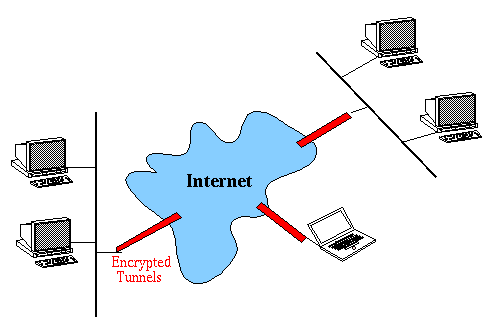
If you’re not certain if you need a virtual private network (VPN), or how you’d go about setting one up, that’s okay. Those three little letters represent a minefield around terminology, compatibility, even legality: ask the younger generation what VPNs are for and they’ll think of anonymous, untraceable access to the shadier corners of the internet. Or, they might picture hackers and ransom-demanding pirates taking control of their victims’ machines.
Those bad people are using a VPN, since technically the term can mean any encrypted, encapsulated link from one internet address to another. That says nothing about what it’s used for, what it can or can’t do, who owns it or whether it’s even working. What attracts the bad guys to such technology is the fact that no-one can peer into the data that moves inside those encrypted packets – although the source and destination addresses aren’t encrypted, so it’s always going to be apparent that a link is active. This is why business VPN solutions generally offer extensive security features: the value of the proposition lies in its impenetrability.
Unfortunately, as a result, the marketing spiel can lean towards impressive-sounding gobbledegook, intended to bamboozle senior management types simply looking for “the most secure VPN we can buy”. If you want to make the right choice, you need to start by understanding what’s possible. Then you can choose a way to do it – and stay on top of the accompanying security obligations.
The benefits of a VPN
The most important benefit of a VPN is that it cuts your internal security problems down to size. Recently, embarrassingly so, there was a time when a Windows network could be constructed over global, public IP addresses, and many early design documents and even practical implementations made use of this configuration. Quickly, it became clear how inadvisable this was: even now, the interval between opening up an unsecured machine to the internet and its being compromised is typically measured in minutes.
A VPN can help here in two ways. First, you can shut off malicious connections entirely if you make a blanket rule only to accept VPN traffic. Second, you can close off the most prevalent exploits by using a border device that doesn’t run Windows. Adopting these two simple measures is much less onerous than having to keep on top of patches and threats to your entire Windows ecosystem.
This isn’t to say that Windows makes a bad entry point for a VPN, or even a bad firewall. But it tends to be best used as part of a multi-device design, with firewalls, routers and SSL concentrators all playing their part in filtering, directing and brokering the traffic before it gets to the server. And there’s certainly no need to use it for regular VPN duties: one thing that’s moved forward in this field over the last half-decade is the burgeoning variety of ways you can land a VPN. Let’s not get bogged down in the technology, however, but look at this from a business perspective.
Small businesses
The most common way to deploy a VPN in a small business is via a slightly smart router, with some small-scale features to support roaming Windows and Apple software clients. This kind of system will do the basic job, but it’s likely to be using L2TP/IPsec for tunnelling and encryption, which often has a painful effect on internet performance as the router struggles to do all the required processing.
It’s also not guaranteed to keep up with changes in the environment. Many organisations relying on a setup like this have recently hit unexpected problems, thanks to changes in the VPN client in Windows 10. On paper, these promise more versatility and better security, but old routers have been left out, and the recommended solution has often been simply to go out and buy a new one. To be fair, it’s difficult to blame manufacturers alone, because communication on Microsoft’s part has been woeful, too. If you can’t make your VPN work on Windows 10, not only are you unlikely to get a clear explanation as to why, you’ll also look in vain for reassurance that whatever solution you come up with won’t be borked in an update.
Even if your router-based VPN is nominally working, many businesses experience intermittent service (and hence high levels of user irritation) because the kit has to work hard and doesn’t tend to cope well with issues. It’s not easy to run tests on a router that can’t reliably tell you when you need a hard reboot – especially when your whole organisation is relying on it for connectivity.
One solution is to move your VPN services into the cloud, rather than keeping them inside a box with some LEDs on it. However, if you’re only dealing with a dozen clients, this may well be overkill. Businesses tend to assume it’s the necessary next step when their low-cost router starts to struggle, when in fact stepping up to a slightly more capable local appliance could solve their problems much more cheaply.
source:http://www.itpro.co.uk/security/28764/the-secrets-of-vpns-for-business